Posts

Showing posts with the label course

Part 2 of 2 Thoughts for Better Visuals During a Virtual Meetings
Image
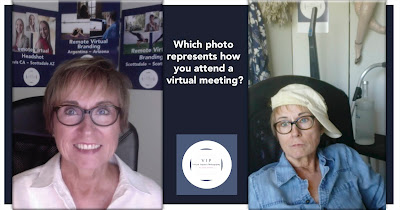
This 2 part blog addresses the professionalism and your personal brand that you can project in a virtual meeting. Don't waste the opportunity or other attendees' time if you aren't going to respect who they and you are. In Part 1  we discussed paying attention in a virtual meeting, dressing professionally, and staying in one place sitting still. The next 3 thoughts address the environmental setting. Backgrounds - Is it as difficult for you as it is for me to concentrate on the person when the background is like a storage facility? OK, that's harsh. But even though not all of us have the luxury of devoting a spiffy space to where we meet it wouldn't hurt to clean up the mess behind. Solution: have your logo, product photos, etc. ( professionally shot if possible ) printed by a retail printer and hang them up behind you. Make sure the photo size is large enough or close enough to your screen that your viewers can appreciate what's behind you. Optional...

Great selfies! Good, Bad, Ugly

Image
We're all selfie-obsessed!  My sister and I were doing selfies decades ago with film (huh!) cameras but had no way to share. The digital mobile phone has turned Selfies into a necessary component of socializing even to only to share online if you're sheltering in place. Over 17 million self-photos are uploaded to social media every week - with those individuals over-55 taking more pics than those aged 18-24. If that many pics are being uploaded imagine how many are being taken daily ~ badly! With summer NOW and Selfies an obsession we're in for quite a season of dropping our phones, bumping into people and falling over anyone in our way.  These 3 tips will help you take better Selfies and avoid walking into traffic when we eventually can walk around in traffic! These tips also work well with or without a mask.  1 - Make sure the light is toward or at least a 45 degree angle to your face. Note: Do not face bright sun without some sort of shade...

Zoomerang - 11 ways to get the best out of a virtual business meeting.

Image
As a photographer I tend to see things that others might ignore or pass over. During the past couple months I've been in many virtual meetings on Zoom, FaceTime and others. Here are my observations and suggestions for a better business meeting visual experience - mostly for your viewers. Environment - have a 'clean' background; take things off your desk if it will show during the meeting. I suggest a neat, professional background with your logo or something specific to your business. What does your business do/sell?  Think about featuring a product, tools used to sell your product or even a display or picture in the background. If you have nothing you want to feature, be sure the background has a professional, organized office feel.  Sound – Please mute when you're not speaking if you have anything in the background that could interrupt or detract from your conversation, particularly if you are on a call with multiple participants. Pets, dishwasher, kids,...

Who does the blue banner belong to?

Image
This is going to be short and sweet. PUT A HEADSHOT ON YOUR LINKED IN ACCOUNT!!!  Do I sound like I'm screaming? Sorry - I am. I'm a little edgy right now. Hope you understand. Do you follow or trust anyone on LinkedIn who won't post a current headshot on their account? Next worse thing to no headshot is posting a 20 year old photo but that's a different argument. Once you have a proper headshot how about filling in all the blue space? It's prime advertising space. Even just a logo is better than blue. I like blue but not on a LinkedIn Cover Image. Use these dimensions from the LinkedIn help page when you want to update your LinkedIn photos.  TAB MODULE MINIMUM IMAGE SIZE RECOMMENDED IMAGE SIZE Page Logo Image 300 (w) x 300 (h) pixels 300 (w) x 300 (h) pixels Page Cover Image 1192 (w) x 220 (h) pixels 1584 (w) x 396(h) pixels You may not be thinking about headshots, advertising, your job, your future - it's understandable. When you do decide to...

5 'secret' tips for taking better photos!

Image
  Photography may not seem complicated to the mobile phone clicker but there are a lot of 'rules' that can help you take better and look better in pictures.  I've compiled a few relaxed ways of making your pictures look terrific. (Of course there's always the option to hire a professional photographer but that's a topic for another blog!) Light is everything. Arrange for the light to be on either shoulder to a 90 degree angle No light in back or in front (make squinty eyes) Use light/bright surfaces to reflect light What you use to reflect will change the color of what you’re shooting Use your automatic settings based on what your light is…sun, shade, clouds – it changes the color of the final photo. Your camera!  Get familiar with it.  Unless you are comfortable using all manual setting to manage ISOs, aperture and shutter speed use the automatic settings for sun, shade, clouds, action etc. Shooting better selfies Please, no  cutesy ...

9 tips for setting up a selfie 'station' for photos and videos

Image
After spending a ton of money on equipment with a plan to make promotional videos for my photography business I was frustrated when I could not get all the equipment to work together. I know my photography equipment inside and out but when it came to producing video not so much, actually not at all! Out of frustration I did a search on line (of course) and found a simple, low cost option that includes what you already have. This hack is particularly for iPhone users but may also apply to other mobile phone cameras as well. This link will take you to a quick video  with the instructions as well that may give you a good visual way to implement the solution for yourself. I will outline here as well. Find something you can put the phone on that is stable. I have a mini-tripod which isn't very expensive and helps. You have a choice of many specifically to hold a mobile phone. Position the camera horizontally which is best for almost all uses. Take the headset provide...

Seasonal Portrait Ideas

Image
With the Arizona heat on the rise I thought a quick list of tips to avoid the blistering sun would be in order. My first suggestion is to plan and arrange for any photoshoot that you want to happen in particular outside today. The type of photo sessions you may be considering include: Senior portraits: What kid doesn't want to have a unique series of photos to show off and look back on. Today's senior portraits are a far cry from the typical studio headshot in color and black and white!  Family Reunion: I once did a reunion of 30 family members in August, in the sun at high noon, no shade whatsoever and had everyone keep their eyes closed until I said 'smile.' Ultimately it worked out but it was HOT. Families don't often together in the same place at the same time so you'll want the best experience possible. Family reunion portraits are such a wonderful remembrance for the years to come.  "The family is one of natures masterpieces." ...

How many faces can you make? A headshot story!

Image
I think a lot about headshots. I think about what's best in a headshot and can come up with a dozen ideas that suit me but maybe not you. What it boils down to is that your headshots reflect your personality, supports your story ~ all while it projects your brand. We live in a visual world. Professional photography has never been as important as it is right now when communicating with prospects and influencing your market. You are the literal face of your business and you want your prospects and clients to know who you are. Building a robust library of photos is key to maintaining a fresh portfolio of flexible visual assets. It is useful to have more than one headshot taken during a session. That provides flexibility for when and where to post your photo. It's an opportunity to always have something new to post and update your followers and clients on social media, place on  business cards, press releases, brochures, announcements and more. Decide what works best f...

How Pre-Event Planning will Enhance the Results of Corporate Event Photography Part 2 of 2

Image
In Part 1 we covered Productive Ways to Use Corporate Event Photography with 14 tips to consider the next time you hire a photographer for an event. Pre-Event planning is an important step that will assure success. Without it it's like darts - hit or miss. The plan will be used to communicate with your team and photographer so everyone is on the same page when it comes to before, during and after the event. There are two key areas to define in the planning stage that should be provided by the organizer to the photographer: a check list of shots that will be needed depending on how the photos will be used and tactical instructions.   Suggested “shot list” many include: Pre-event setup. This can involve set-up, preparation and decoration throughout the construction phase before the attendees arrive A step and repeat at the 'Red carpet' location as the attendees arrive Posed and candid shots of VIPS such as speakers, awardees, key clients etc. Crowds m...

Top 14 Productive Ways to use Corporate Event Photography Part 1 of 2

Image
 (Part 2 Will Cover How Pre-Event Planning will Enhance the Results of Corporate Event Photograph y) The original title of this article was 'Where do your event photos go to die?' It seemed a little harsh. Practically speaking, though, I know that most photos taken at an event will end up in a digital boneyard. Why? Because... Organizers don’t know what to do with them The person responsible is too busy to follow-up The company may lack a marketing perspective The company uses stock photos. One hopes it doesn’t show up on a competitor’s website, just sayin’! It’s been known to happen. A strategic plan wasn't put into place prior to the event  Finally, Who cares! Wow. I have to confess that when I produced events in the 90’s I didn’t have photos taken. That was before the ubiquitous availability of digital photography. Do I wish I had?  You bet because there are so many relevant and valuable uses for the photos from events. Let’s go through some he...

Hanging a photo gallery.

Image
Taking photos is just the beginning if your plan is to print and hang a single or gallery of portraits. Hanging photo groupings can be a challenge. Check out this video for installing multiple photos using a template and simple tools to install something similar to this client's annual photos.  The template used for this wall was provided by the lab for use specifically with these displays but you can create your own templates with a little planning, paper, tape measure and pencil. Go to Video! Any questions get in touch. Call me at 480-353-9415 or email. Enjoy!

5 Pointers How to Hire a Branding Photographer

Image
As the New Year begins, it is the perfect time to evaluate, renew and refresh you branding and marketing materials. This should include your written content as well as your visuals such as video and photographs.  Both should clearly reflect your branding image.   Last year, I decided to add videos into my Branding mix.  I had planned to use them for several scheduled promotional opportunities.  The videographer and I had a prior general discussion, but in retrospect, not thorough enough. I didn’t have experience with this medium and process and frankly, didn’t know what to ask. The results were misaligned with the outcome I envisioned and they didn’t meet my quality expectations.  It was an expensive lesson. The purpose of this article is to provide you with guidance and preparation when photography is involved in your branding and marketing plan.  Here are 5 important steps that will result in a successful photography branding session. Be Clear ...

5 Ideas For What to Wear, Location and Colors

Image
What you wear in your photos is important whether you want branding, family or headshots. It should reflect you, your interests, personality and style. The feet in the cover photo belongs to a client who is a dancer and runner. She wanted this image to represent her interests and passion.  Following are the tips that may help in your clothing selections, location and more. Look around on Pinterest where there are a ton of options. Search for words like 'photography' 'color' 'clothes' 'family' for instance. You'll find color palettes and more. Clothing should represent your personal style and the location where the photoshoot will take place. High heels at the rodeo may not be the best way to compliment the location. You get the idea Yes?  Don't be afraid of color. It's your friend. Colors can enhance the style of the shoot - formal, informal, athletic, hobby etc.   It's not necessary for everyone to match in fact I always...

5 Tips For A Great Outcome When You Take Pics

Image
It's not your camera, it's what you photograph that counts. I've been thinking about what we should all consider when we're planning and taking photos. Here are a few tips that may help in your photography journey. Pick a waterproof case if you're going to be near or in water. Nothing more disappointing than watching your camera flutter to the bottom of the pool, bathtub, lake and anywhere there is water. Leave free space on your digital card for plenty of photos. Newer digital technology built into the casual users camera allow high resolution photos that may take up a lot of space on the card. Even a mobile phone can run out of space. Either have a second card backup or delete those redundant selfies. That will  guarantee you don't run out of digital 'film' right at the most important time in your vacation, family gathering etc. Change your perspective. Move the camera up and down, move you or your subject to the left and right. The photos wi...

4 Ways To Avoid The Photo Popsicle

Image
There's always a lot to think about for the professional photographer much less the casual picture 'taker.' Here's one tip that's pretty easy to avoid. The Popsicle! 1. Anytime you 'pose' your photo think about what's growing out of the subject. I call that the popsicle. It's distracting and easy to avoid. 2. I scoured my photos for an example and finally found this ONE. I have taken many photos with things growing out of my clients. I dump them as soon as I notice the problem. 3. You only need to move a couple feet or even inches left or right up or down to avoid the problem. In the case of the sample photo it was even growing out of his ear.  4. You probably will never find actual popsicle sticks in nature growing out of any head but you will photograph something like the sample. Happens ALL the time. Enjoy! Check out my article  15 Tips For Better Headshots I hope that you find this little tidbit helpful.  If you enjoy the ...

5 Ideas To Include When Planning For Holiday Photos

Image
The holiday are upon us. It's 114 degrees outside in Arizona so most people aren't thinking about Halloween which is 71 days, Thanksgiving 99 days away or the winter holidays. Family Portrait Portfolio These tips will help you to plan the photoshoot so you're ready when you set an appointment with your photographer. Plan your wardrobe. It make such a difference to coordinate colors and styles. Maybe you want red for Christmas, green for St Patricks day, gold and silver for New Years. Use your imagine and fit the palette to your theme. Find a fun or interesting location that will say something about who you and your mates are in the photo. A baseball field, the Love sculpture in Scottsdale, Wrigley Mansion in Phoenix, the bridge in Tempe and one of the many beautiful mountain areas surrounding the valley. Plan the photoshoot during the day at a time where everyone has eaten (you don't want low blood sugar to ruin the event) especially the kids.  ...

Tip Tuesday: 3 Things NOT To Do If You Don't Want To Die Taking Photos In Public

😓😢🙈🚂 I typically start out an article or post with as much an upbeat tone as possible. This email, however, has an entirely different tone.   A l ittle glum but useful.   Never, ever, ever stand or have your photo subject stand on railroad tracks. Most of the time the train will be way past you before you ever hear it. You know what that means! It's happened more that just a few times that the client or photographer have been killed as a result of getting that 'fabulous' shot down the middle of the tracks. Seniors particularly like this setting.   Same concept as in 1 above. Don't stand in the middle of the street. You do not have right of way just because you're doing something like taking a perspective photo of the Empire State building.   Stop texting when you're walking. It's just plain rude and selfish to think that others have to watch out for you rather than you watching out where you're going. PS I know this because I've done it....